A local-first IES lighting simulator for the browser: import real photometry, model a room, aim your
luminaires, or just describe the space — and read the work plane as a heatmap with engineering metrics.
Direct light plus up to four diffuse bounces, calculated on your machine.
Plate 01 / PlanAtelier · 6.00 × 4.00 × 3.00 m · as new
Average
467 lx
Uniformity
23%
Target
79% ≥ 300 lx
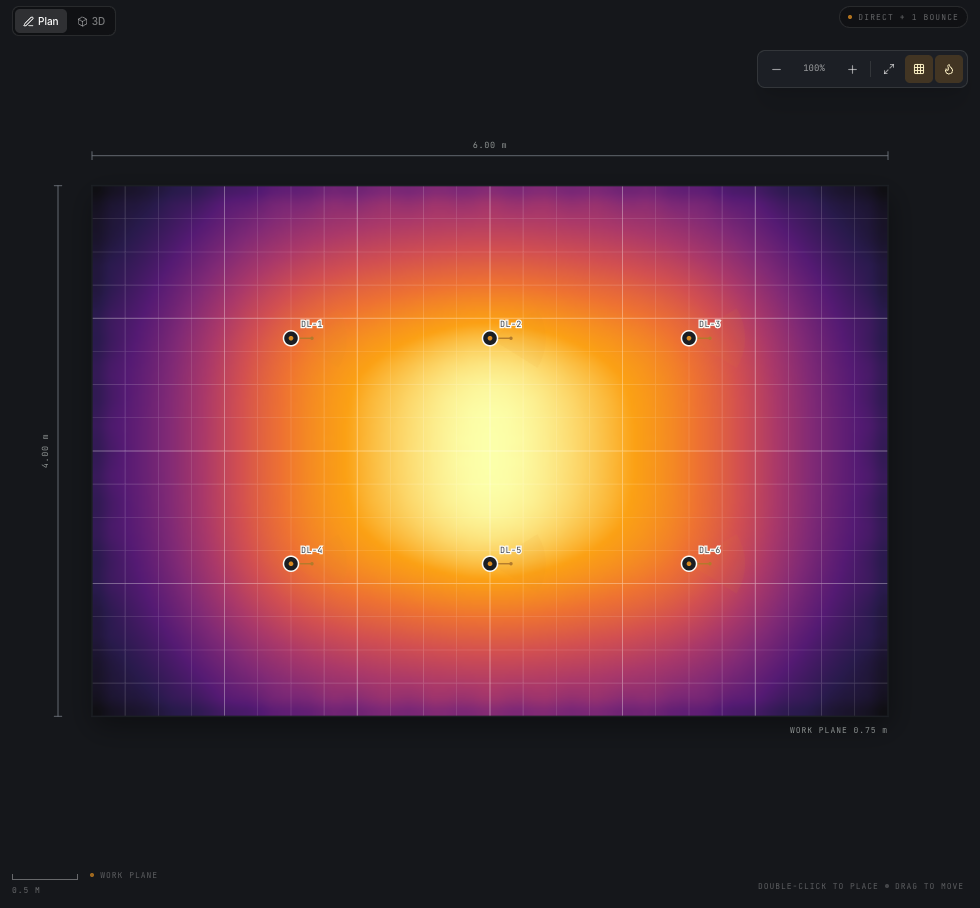
Fig. 01 — Demo atelier: six 2,400 lm downlights, a 64 × 43 grid and 450 surface patches.
Mean 467 lx as new. At the default 0.80 maintenance factor the same
room reads 373 lx maintained.
01What it does
A lighting study, not a render.
Photometry, geometry and result stay visible and editable. No hidden defaults, no black-box solver.
01 / Input
Import real photometry
Drop in an LM-63 Type C file. The parser reads the angle tables, symmetry and candela, draws a polar
distribution, and surfaces the lumens, watts and maximum candela behind it.
LM-63 · Type C · TILT=NONE
02 / Model
Build the room, aim the light
Set a rectangular room, work-plane height and surface reflectances. Place luminaires by hand, or stamp a
block of them with grid placement, then tune mounting height, aim, tilt and dimming in the inspector.
X/Y · Mount · Aim · Tilt · Dim
03 / Result
Read the work plane
Switch between total, direct and reflected illuminance. Track average, minimum, maximum and uniformity,
check a target-lux threshold, and hover the grid for a point reading. Up to three labelled isolux
contours trace the levels that matter, and a maintenance factor turns as-new figures into the
maintained values you specify against.
Average · Min · Max · U0 · Target
04 / Ask
Describe it, then calculate it
Type the room and the light you want — "20 × 15 m office, 500 lx" — and LuxLab builds the
scene, sizes the layout by simulation and reports the result. With a project open, ask
why the result looks the way it does or request a small change; LuxLab applies it,
recalculates and shows before and after. The provider reads the brief or project summary;
geometry, photometry and every lux value stay in the engine. Administrators choose
DeepSeek or OpenCode Go and manage the encrypted key in Settings; each person can still
hide the bar in their own browser. Select several lights to move them together, and
export the whole study as a PDF plan, 3D view and results report.
A short loop: edit, debounce, calculate. The worker keeps the interface responsive while the grid runs.
01Parse
Import and validate
Open the IES library and load a Type C file. LuxLab checks the header and angle tables, expands symmetry,
and builds a bilinear candela sampler.
Rejects TILT=INCLUDE · Type A/B
02Model
Place and aim
Set the room and work plane, then place luminaires in plan. Use the inspector for mounting height, aim,
tilt and dimming. The 3D view is read-only.
Walls block light · No shadows yet
03Read
Calculate and inspect
Recompute and read the false-colour map. Compare total, direct and reflected views, then check the
metrics and the target threshold.
Direct + up to four bounces
03Local-first
The calculation never leaves the tab.
No project uploads and no server-side render. An account gates the tool; the geometry, photometry
and results stay in the tab. If you use Ask LuxLab, the sentence and a list of fixture names go to
the configured AI provider; turning the assistant off in Settings sends nothing. Projects and IES source text live in
IndexedDB, and the service worker keeps the tool available offline. Close the lid and the room is
still there.
Private by default
No project uploads and no tracking cookies. Your project stays browser state, not a
server record; page views are counted anonymously. The assistant is the one network
feature, and it is opt-out.
Instant feedback
The engine runs in a Web Worker. Edits debounce for 360 ms; only the latest calculation survives.
Install it and unplug
An installable PWA. The app shell and fonts are precached after one visit; a cold start still checks your session online.
Portable projects
Exports are self-contained .luxlab.json files with every referenced IES profile embedded.
IES→Parser→Worker→Canvas→IndexedDB
Plate 02 / 3D previewProjects stay in the browser
6 luminaires450 patches467 lx mean as new
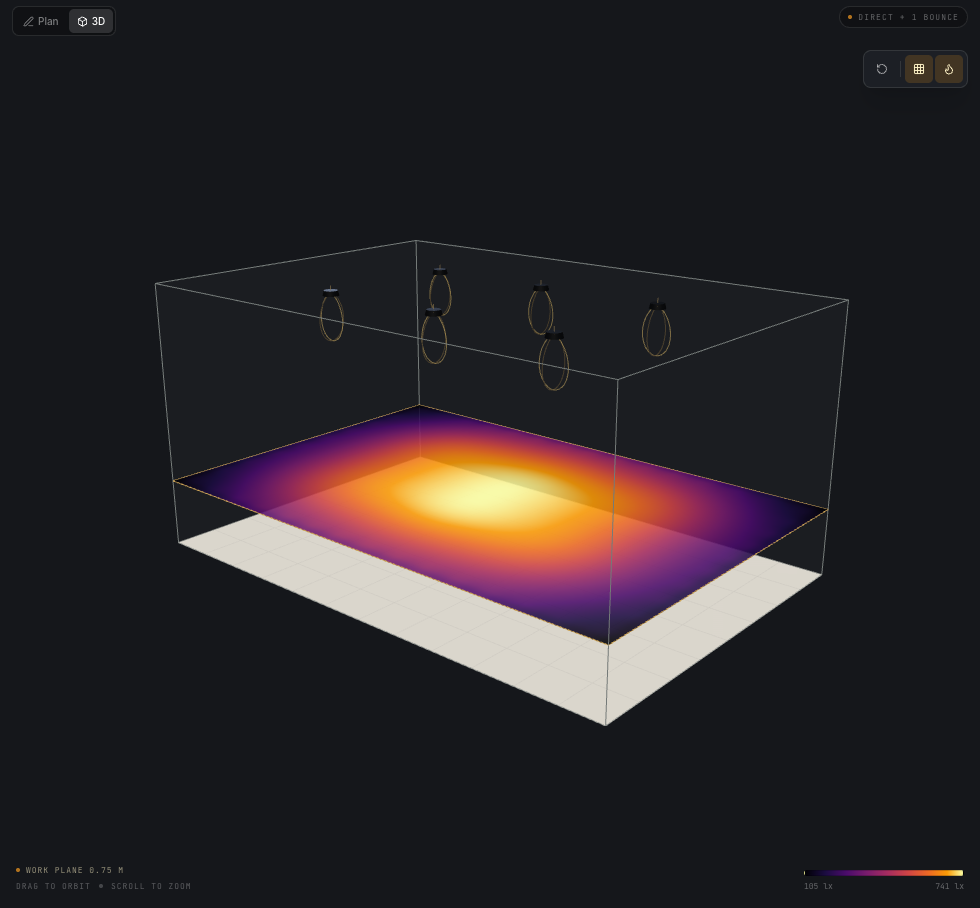
Fig. 02 — Work-plane illuminance in the read-only 3D preview. Same 450 patches; rendered locally.
04The plan
Credible studies, at browser speed.
v0.21.0 is tagged and in use. Undo and Redo now cover the whole project: a light move, a
delete, a setting change and an assistant edit are each one step, and a drag undoes as a
whole. The public handbook lives at /wiki/, and the workspace has a Help menu, a shortcut
sheet and a status bar that names the current tool and calculation state. Deleting a room
asks first and tells you how many lights go with it. Draw a room with a rectangle drag or
an orthogonal outline, edit corners and walls with snapping, type exact wall lengths and
move a room with its lights. The Projects lobby remains an
OrbitX portfolio. Press Select in the luminaire list to choose lights explicitly, then move
or delete them together. Export a full A4 PDF with a 2D plan of every room, a 3D view, all
results and the schedules. Describe a space in the Ask bar and LuxLab builds, solves and
calculates it; with a project open, ask why the result looks the way it does or request a
small edit, with Undo behind it.
The goal
Make a credible IES illumination study as quick as opening a tab: fast enough to iterate, private enough
for client work, and accessible enough that photometry isn't locked inside desktop software.
Shipped now
Shipped
One or more rooms on a shared floor plan, each with its own ceiling
Polygon room outlines, with walls that block light
Stepped and L-shaped rooms you can draw and reshape
Two workspaces: warm paper, or the OrbitX dark palette
A floor summary, area-weighted across every room
Type C, TILT=NONE IES import with polar preview
OrbitX catalogue: 97 IES profiles across 20 families
Direct illuminance plus up to four diffuse bounces
Multi-select on the plan, to move or delete a group at once
2D plan editor and read-only 3D preview
Average, min, max, U0 and target compliance
Up to three labelled isolux contours
Maintenance factor: fixed, or the CIE 97 four-factor method
Grid placement for blocks of luminaires
Accounts with roles, an admin dashboard and first-run password change
IndexedDB projects with self-contained JSON export
Installable PWA with local projects
Next
Unscheduled
→Freeform outlines at any angle, and rooms that share a doorway
→Openings, furniture and shadow rays
→CSV and PDF report export
→Glare metrics, including UGR
→Type A/B photometry and TILT data
→Multi-bounce or path-traced verification
No dates. Scope follows what the method can support honestly.
05Method
A short, inspectable pipeline.
Parse, interpolate, integrate, display. Every result is reproducible from the inputs, in the browser.
01LM-63
02Bilinear
03Worker
04Typed arrays
05Canvas
06IndexedDB
01
LM-63 parser
Type C, TILT=NONE, header variants and symmetry expansion. Unsupported photometry is rejected, not approximated.
02
Bilinear candela
Vertical and horizontal interpolation with 360° wrap-around. Dimming and the maintenance factor scale candela linearly, per luminaire.
03
Web Worker
The pure engine runs off the main thread. Edits debounce for 360 ms and the latest request wins.
04
Deterministic heatmaps
The inferno scale is driven by the data's min and max. No random dithering, no per-frame noise.
05
Local IndexedDB
Projects and IES source text persist in the browser. Exports embed every referenced profile.
06
Offline PWA
The app shell, fonts and lazy 3D chunk are precached after the first visit. No CDN in the path.
Calculation
DirectE = I(γ, C) · cos ε / r²Up to four bouncesBᵢ¹ = ρᵢ · EᵢBᵢk+1 = ρᵢ · Σⱼ Bⱼk Aⱼ cos θⱼ cos θᵢ / (π rᵢⱼ²)Eref(p) = Σₖ Σᵢ Bᵢk Aᵢ cos θᵢ cos θₚ / (π rᵢ²)MaintainedEm = MF · (Ed + Eref), MF = LLMF · LSF · LMF · RSMF
Bilinear candela in γ and C. One bounce by default and up to four; still an estimate, not a full
radiosity solve.
Fixture check
750 lm declared→748 lm integrated
A public Cooper Lighting MRZ Type C profile was integrated at 1°. The check exercises angle handling and
flux integration — it is not a certification.
Third-party fixture · Not a compliance claim
06Changelog
What shipped, in order.
Generated from the project changelog on every deploy, so the page cannot fall behind the release.
v0.21.0
Added
A chat-first room simulator at /find/chat/. One message with the room size and the kind of light (6 × 4 m lounge, warm and cosy) is parsed locally, three OrbitX candidates are compared and the best fitting is placed in a plan of the room with the real heatmap, fitting count, average maintained lux, evenness, coverage and running cost. Follow-ups such as brighter, 6 × 5 m, cheaper to run, panels or why this one? recalculate or answer from the result. The chat reads the message in the browser and does not call the AI provider; it uses the same catalogue, engine, assumptions and consent-gated lead endpoint as the wizard. The step-by-step finder at /find/ is unchanged and remains the AI-guided path.
Changed
The finder build now has two entry points, and the Caddy route resolves /find/chat/ without caching the chat shell.
The wizard's welcome and the landing hero link to the chat. npm run smoke:advisor:chat covers the chat flow (missing size, calculation, follow-up, question, lead and outdoor refusal).
v0.20.3
Changed
Refined the project update page with the UI/UX Pro Max guidance. The page now uses a Swiss-style squared control language, stronger text contrast, a mono date label, 44 px touch targets and a sticky-header scroll offset for anchor links. Content, the live check and the private feedback flow are unchanged.
v0.20.2
Changed
A calmer project update page./progress/ is now a short, light reading page: a one-sentence headline, three expandable product rows (live products first), what is next, the latest release and a simpler feedback form. The detailed features, limits and release notes sit behind simple disclosures instead of filling the page. The live check and the private feedback flow are unchanged.
v0.20.1
Changed
The deploy build fetches the Mac app's branch before injecting its status. When the deploy runs on a host whose clone does not yet have origin/pro/macos, the build now fetches it, so the progress page gets the phase detail without reinstalling /usr/local/bin/luxlab-update first. The fallback copy is also clearer when the branch cannot be read.
v0.20.0
Added
A public project progress page at /progress/. One plain-language page covers the three LuxLab products: the Mac app (Pro) in development, the simple client website (LuxLab Match) and the full web tool. It shows what is live, what is being built, what is next, the shared engine and the honest limits. It is generated from the repository's release records rather than being hand-edited.
The Mac app's phase status is read from its own branch on every deploy. The update script fetches origin/pro/macos, reads the phase checkboxes and the latest Pro version/date, and injects a safe summary into the page. Nothing from the Pro plan's strategy, pricing or competitive notes is published, and the Pro branch is not merged.
Feedback from the progress page. The form stores a note with the product, the live version and commit, a category and an optional contact. Notes are private, kept for up to 365 days, store a hashed connection ID instead of the raw IP, and appear in a new admin Feedback tab with product and status filters. An optional email copy is configured with LUXLAB_FEEDBACK_EMAIL.
The service reports its deployed release.GET /api/health now includes the version and build time from a RELEASE.json written by the deploy script, so the progress page can show the version that is actually running.
Changed
The deploy script fetches the Pro branch, refreshes the live page's Pro block even when main has not changed, and installs the Caddy route for /progress/.
The service cleanup now also removes progress feedback older than 365 days.
Fixed
GET /api/health no longer reports dev for the deployed version.
07Ready when you are
Start with a room. Leave with a number.
One click from the project list: 6 × 4 × 3 m, six 2,400 lm downlights, 373 lx maintained at the default
0.80 factor. A free account keeps it yours; nothing you draw is uploaded.